If you are using an older version of Paintshop Pro, you surely have noticed that you can align vector objects, but what do you do if your objects are NOT vectors? You have to rely on the guidelines, and snap the objects to the guidelines.
In newer versions of PSP (X4 and up), since you can select several layers, the ability to align raster objects is added, but if you are using an older version, it was not possible, until now.
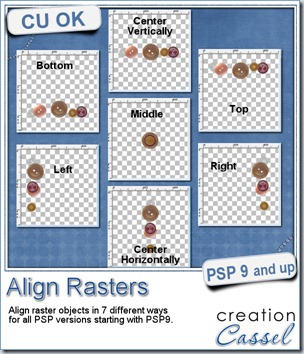
This script will allow you to align raster objects in 7 different ways: top (aligning with the top of the highest top), bottom (aligning with the bottom of the lowest bottom), right (aligning with the right edge of the furthest object to the right), left (aligning with the left edge of the furthest object to the left), middle (aligning all the objects based on the center of the canvas), center vertically (align with the vertical center of the canvas), center horizontally (align with the horizontal center of the canvas).
Only one script includes all the seven alignment options. Bind the script and add it to your menus for a two click process: one click to run it, one click to choose the alignment. No other message window is added to create the fastest process.
You can get this script in my store: Creation Cassel.
There is a random draw available in the DST forum where you can win this script. Just add your name to the thread and tell me what version of PSP you are using. I will announce the winner on Monday night. Check this thread HERE.

This week, your free sample was made using the Banner FONT. You get a SPRING set in PNG format, and a blank set in PSD format.
You can add any letter or design to the blank banners to suit your own layout or project.
Remember that those banners are made from a FONT. That means that it can be used in most programs, and if your program allows you to add text to path, you can hang the various flags along the “vector string” for a perfect positioning.
In addition, the font includes no less than 50 different shapes that you can combine, and use in any size without losing quality, and you can have an outline and a fill material that will suit your theme or project. This is much more versatile than simple PNG banners!
You need to be logged in to download this sample. You can either login, or register on the top of this page.
April is coming
Yeah, what’s new about it? Something big, i tell you! You have to stay tuned to learn more about it but i can give you some hints:
Hint #1: get your wishlist ready
Hint #2: check the Master Classes in the Campus (watch the video for the free one or any other you might have purchased)
Hint #3: get ready for a BIG event!