Web
Analytics

New script – Waterwork

cass-Waterwork

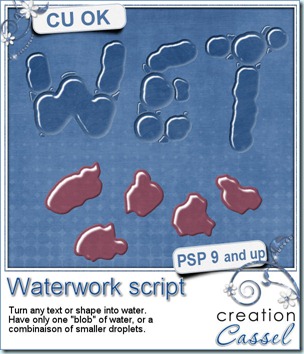
How about some fresh water added onto your layout? This script will convert the text or design of your choice into clear water, complete with shine and refraction from the bottom surface.

You can get the script to use smaller droplets to fill in the design, or use the shape as is. Use any color if you want to simulate juice drops!

Exceptionally, this script will only work with PaintShop Pro 9 and up (sorry for PSP8 users).

All the designs will be slightly distorted, so straight lines wont stay perfectly straight, and corners will be rounded off. Use the simple round brush and hand write or hand draw something. Draw random blobs to create droplets, or draw letters in an uneven manner for best result.

You can get this script in my stores: CreationCassel and DigiScrapWarehouse.

And how about winning this script? Check out this thread in the DST Happy Place. Simply give me ONE splashy word you can think of and add your name.
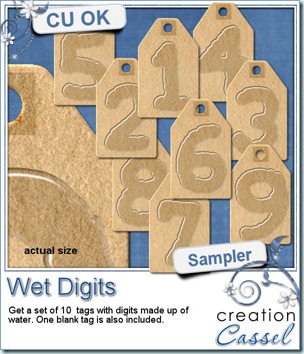
cass-Wet-Digits As usual, i have a little freebie for you. This is a set of wet digits on a tag. Each tag was made using handwritten digits run through the script. You get all 10 digits and one blank tag for you to add your own.

You need to be logged in to download this sample. You can either login, or register on the top of this page.

Each tag is pretty large so you can resize it as you need.


News from the Campus

Did you follow the newsletter from the Campus? Did you know that the second section should be released soon? Yes, the second section is all about creating elements yourself instead of solely relying on purchased supplies. You would then be able to either create your own elements yourself, from scratch with the shapes and colors you need, or you can learn to modify the elements you already have and personalize them to fit the layout you want to create. This should be open to registration soon. If you want to be among the first ones to register, you can add your name to this mailing list, and tell me which type of element/technique you want to learn about first. I have dozens and dozens of tutorials planned, but which ones will i release first? You tell me what YOU want! If you dont want to add your name to a list, you can just email me or even add a comment below. I will see it all.

Remember to keep an eye on the Campus and your emails as there will be some time limited special offers so, watch out.

Although most of you might be scrappers, i am sure you can find other uses for your scrapbooking supplies. Whether it is invitation cards, wishing cards, calendars, and more. Check out the article here.
New Script – FLower Power

cass-FlowerPower

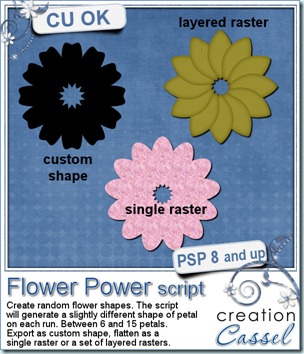
This little script for Paintshop Pro might not seem like much but how often did you want to get a flower shape and had to do all the duplicating and rotating manually? This script will do just that for you. With a random feature integrated, you might get between 6 and 15 petals, and each petal will be slightly different in size and shape, so you will always get a new shape.

In addition to creating a different shape, you can generate it as a vector shape to be exported as a custom shape, so you can use it at any time, later on. You can choose to have it in layered raster with your choice of color, gradient or pattern, or you can ask for a plain basic flat sample, again in the color of your choice (perfect for layering).

Once the script is run, you can keep adding details, modify the individual petals, add glitters on the edge, re-arrange the petal order, remove one petal, etc. So many things you could do!

You can get this script in my stores: CreationCassel and DigiScrapWarehouse.

If you want a chance to win this script, simply go over to the DST forum, and add your name to this thread. I will be back on Monday with the name of a winner.

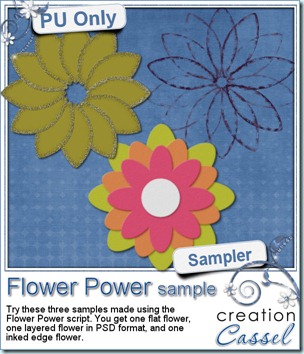
cass-FlowerPower-sample I am sure you are also looking for a freebie sample for this script. That is exactly what i did. I ran the script and got a few random shapes and i played with them. On one layered shape, i added a glittered edge with the Glittered Edge script on each individual petal, then i slipped the last petal under the first one for the  gold color flower. Then, i played with the Felt script to add a felt texture on 3 coloured copies of the same flower, and layered them. You get one PNG sample and the matching PSD format flower. Finally, i ran the Inked Edge script on a purple flower, petal by petal, and then, i removed the petals themselves, leaving only the inked border. I think it does give a really fun result that i didn’t even expect! What can you do with that script?

You want to play with those? You need to be logged in to download this sample. You can either login, or register on the top of this page.


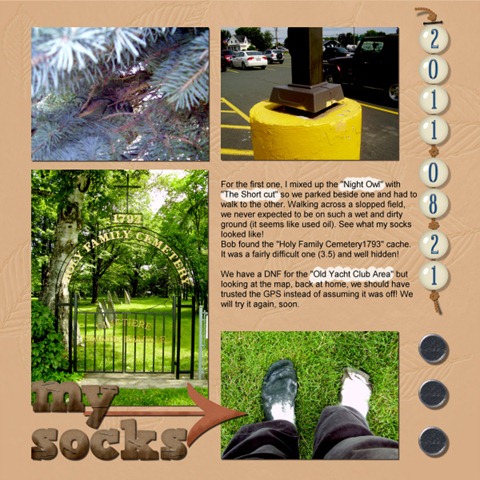
For the fun of it, this week i took the time to create a scrap page about one day of geogaching with my husband. It was a fun day, and since i have been meaning to make a whole album on our geocaching adventures, which started 3 years ago with my sons, i think i just found a style that might work for this. What do you think? I might just post the other pages as i create them. Do you do geocaching? Tell me about it!

2011-08-21-600


From the Campus:

This is getting more and more exciting. Several people emailed me saying they would like to learn how to create this and that element with their Paintshop Pro, and i kept smiling because that is exactly what i am preparing! Many tutorials are in the making to create papers, elements, textures, fasteners, text effects, and more. So keep an eye on the Element Creation Tutorials of the Campus, subscribe to the mailing list if you want to be first to learn when registrations open so you can take advantage of the special price.

8 Secrets to quick photo fixes with Paintshop Pro

front-page-3D-250

Do you have some photos you would like to use in scrapbook projects, but you feel they are just… bleh. Maybe the colors are faded, maybe some of them include unwanted elements, too much noise, etc.

If you like those photos and you still want to use them, you can fix them quickly. And when i say quickly, i mean in less than 30 seconds, using Paintshop Pro.

You want to know more? simple. Just visit the Campus and add your name to the mailing list. That’s it. Nothing more. The ebook will then be yours, FREE. No strings attached.

If you want to display your favorite photos, why not make them the best they can be.

Click HERE to go to the Campus. (excuse the dust as it is still in the building stage).


While you are visiting the Campus, have a look at the beginner tutorials, in the Quick Scrap section. And you can also visit the contributing designers’ blogs! Stay tuned as the Campus will have more and more as the videos and equipment are unpacked. Adding your name to the mailing list will assure you to get the news as fresh as can be!