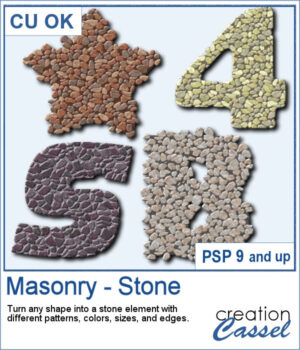
 You can turn any shape into a masonry element, whether you want to have a fairly neat edge or give a more rustic look with full stones but more randomly placed on the edges. There are 5 different patterns with 3 different colors each. Furthermore, you can choose to have small, medium, or large stones.
One great feature of this script is that you can select different settings for each run, but if you need to create a series of matching elements, you can edit the script to set those preferences and it will run without asking you all those questions.
Get this script: Masonry-Stone
Want a chance to get this script for free? Head over to this Facebook post and tell us: What kind of shape or title would you turn into a masonry element? A date? A house number? Maybe a word like “HOME” or “STRONG”? (Remember — only comments count. Likes and shares are appreciated, but won’t count as entries.) A winner will be announced in next week’s newsletter. If you’re not on the list yet, you can join right here. It’s free, and we only email once a week!
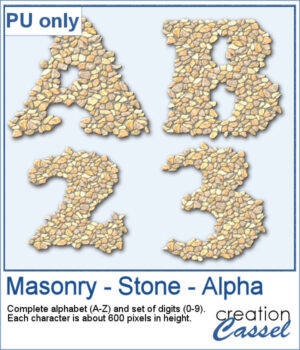 For a sampler, I edited the script to select the same settings for all the characters in a full alphabet and a set of digits. Each character is about 600 pixels high in PNG format so you can use them in any program.
You need to be logged in to download this sample. Please log in or register using the links at the top of this page.