Web
Analytics

New script – Alpha Pieces

cass-AlphaPieces1

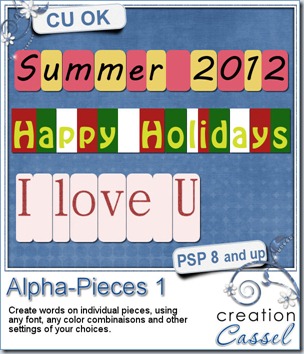
I have seen someone use little pieces of paper, side by side, all the same height, but different width depending on the letter. I thought it was a cool idea, and wondered how to replicate that fun effect without the tedious task of measuring all the characters. I guess scripts are handy with that as they work much faster than my brain could in doing those maths!

This script allows you to create words on a single image with each piece being on a separate layer.

You choose the text, the font, the colors, and you can also ask the script to create the individual pieces with some extra space on top or on the bottom or both. This gives you even more options as you can now add holes, fasteners, insert the pieces under other elements, etc.

Since the pieces are left on individual layers, you can still apply various effects to them, add textures, edges, grunge them, or run other scripts on them.

You can get this very versatile script in my store: Creation Cassel.

There is also a draw that will take place in the DST forum, where you can enter by telling me what you can use this script for? What could you do with those words, or individual tiles? Add your suggestions HERE, and i’ll be back on Monday night with the name of a winner.
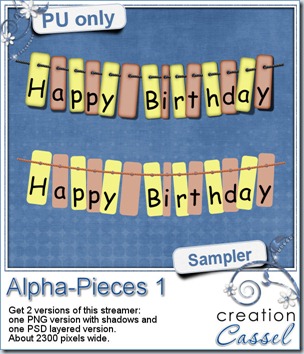
cass-AlphaPieces1-sampleThis week, i ran the script to create all the pieces for a Happy Birthday banner or streamer. I used the Rope tube and the Vector Tube script to create that smooth looking string. I also ran the Twister script to give that random rotation to the individual pieces.

The banner is 2300 pixels long and offered in two different formats: one is a PNG format and has the darkened edges, the lifted shadows and the weaving string, while the other one has all the pieces in individual layers and offered in PSD format. You can apply the effects you want, move the letters around, use the string or not. You can just fasten the pieces with buttons, or staples, or many other types of fasteners. You can even recolor them if you want!

You need to be logged in to download this sample. You can either login, or register on the top of this page.

You know that DSD (Digital Scrapbook Day) is coming our way, right? This will be on Nov 3rd. Something will happen in the store that does not happen often. A SALE. Yes. I am not telling you what kind of sale, but you surely will want to update your wishlist. Remember that if you log into your account, you have access to your own wishlist so whenever a big event happens (like DSD), you will be able to get to what you really want, faster, so you can play with your goodies, sooner!

You have one week to get ready!
New script – Brushed Metal 2

cass-BrushedMetal2

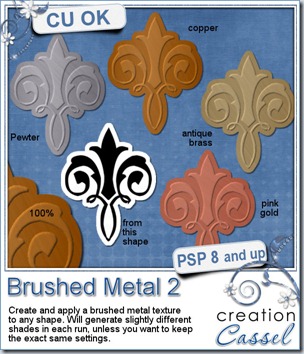
In addition to gold, silver, bronze and brass, from the first set of brushed metals, here is another set, for pewter, copper, antique brass and pink gold.

Use any black and white design and the script will emboss it where you have black but will cut out where you have white.

Use it to create embellishment, alphas, frames, accents of any kind.

It is basically a one click process: one click to start and one number to choose which metal you want. Because of a random feature coded in the script, successive runs for the same metal might yield slightly different shades of the color. If you need to run the script several times for the same metal and want the exact same settings every time, you can edit the script to set the values yourself.


You can get this script in my store at Creation Cassel. As usual, this is available at 25% off until Sunday night as a new release special.

If you want a chance to win this script (even if you already purchased it), you can go to the Happy Place HERE, and add your name to the thread, telling me what metal you would be more likely to use, among the 4.

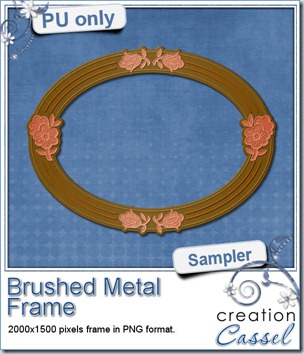
cass-BrushedMetal2-sample-frameThis week, i created this frame using 3 of the metals of this script. It is 2000x1500 pixels in size and in PNG format, so anyone can use it.

You can also add some gems to this frame, or flower clusters even if it would cover one of the pink gold flower.

How about this? You use this frame, and make something out of it with clusters, or ribbons, or something else, and you show it to me. I might just display it in the next blog post or even in the newsletter. What do you think of this?

You need to be logged in to download this sample. You can either login, or register on the top of this page.


New Script – Flower template

cass-FlowerTemplate

Layered templates are great to customize elements to match a kit, a layout or any project you want to do. But you might either be tired of the templates you already have or don’t want to go through the trouble of making new original ones because it is time consuming (rotating petals to make a base, duplicating, rotating, resizing the layers, calculating how much to resize or rotate, and repeat for as many layers you have).

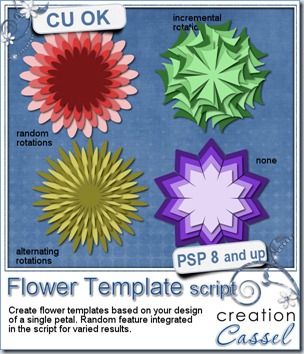
This script will do all the calculation for you and all the tedious work. You only have to choose the overall size (from 500 to 1800 pixels), draw your own unique petal and choose which type of rotations you want for the subsequent layers. That’s it. The script does the rest.

How many petals you get? How many layers you get? How much each layer will be resized? That is all up to chance as there is a random feature integrated into the code so you can start with the same initial petal and get many different kinds of results. That is a great tool to create matching similar flowers, even though they are not perfectly identical.

Once you have the greyscale layered template, use them as you wish. Color the layers, move them, replace them by papers from your kit. You can even add various effects to them by using different scripts. Try the Edge Magic, the Glittered Edge, the Inked Edge or the Colored Edge.

This very versatile script for Paintshop Pro is available in my store: Creation Cassel

If you want a chance to win this script, check out this thread in the Happy Place where you can add your name and be entered in the draw. The winner will be announced on Monday night.

cass-FlowerTemplate-sample


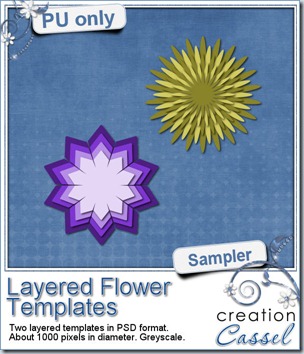
This week, i am offering you two of the four flowers created for the preview. One has no rotation to the various layers (although you can rotate them if you want) and one illustrates the alternate rotations.

They are both about 1000 pixels wide in greyscale (the color is only for the preview purpose) and in PSD format.

What will you do with them? Show me. These templates are soooooo versatile, i am sure 100 users would create 100 different pieces of art with them. Let’s start a show off!

You need to be logged in to download this sample. You can either login, or register on the top of this page.


New script – Alpha-Beads 2

cass-AlphaBeads2

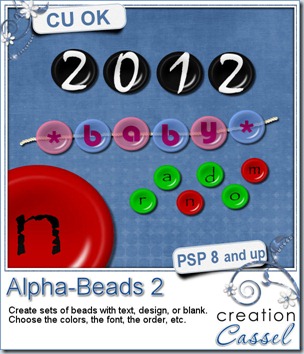
Unlike the previous Alpha-Beads script, this one will generate a different type of beads, but the basis is the same: you choose the font, the text, the color of the bead, the color of the text, the transparency. You can also choose whether you want the colors (of the beads or the text or both) to be all the same, or using multiple colors and if using more than one color, if you want them in sequence or randomly picked.

You can type in any word or phrase, and the script will create a bead for each character, whether it is a letter, a digit, a symbol or a space. You can also create blank beads, or a bead where you will add your own design that is not in a font format.

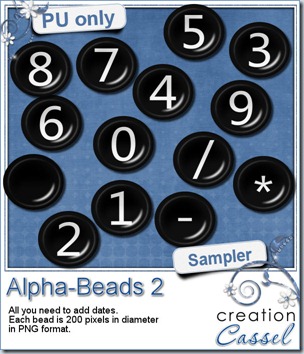
These beads give the impression of being slightly indented. Attach them with a string, a pin, a toothpick, a chain, or glue them on their own to create dates, names, phrases, titles, etc.

You can get this script in my store: Creation Cassel

In the Happy Place, there is a draw for this script. You can win this script on Monday if you add your name to the thread. But that is not all. EVERYONE who posts in the thread will win something. Place your order of what kind of beads you would want, and on Monday night, i will draw for one order and EVERYONE will get that order. So even if you are not a PSP user, you can enter and you WILL win something. Go for it!


cass-AlphaBeads2-BlackWhite-digits

This week, i created a simple and versatile set of alpha beads with digits, a blank and a few symbols that can let you create dates.

You need to be logged in to download this sample. You can either login, or register on the top of this page.

A full set of beads for the whole alphabet will be available to our newsletter subscribers, so you can complete this set.

Our newsletter is released on Sunday morning, so you still have time.

Subscribe to the newsletter HERE.