
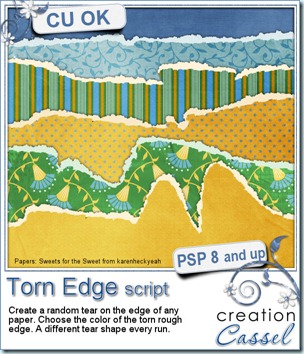
Do you ever want to have a look of a torn piece of paper on your layout? Maybe for a freestyle look or a wilder look. I am sure you could achieve the same look by manually trimming the edge randomly, then adding an edge, also randomly. I have done the same and it is not too hard, but, after a while, I find it is hard to be “original” in the line design. All my edges looked kind of the same. With this script, this will never happen again. The line design is created with a random feature integrated so no matter how often you run this script, you will always get a different edge. And if you don’t like the edge you got, easy: undo and run the script again. It will only take a few seconds!
As you can see on the preview, you can get a torn edge that is fairly straight, but you can also get a wildly torn paper.
You will get the actual edge on a separate layer than the paper itself so you can add your favourite texture, or just add some noise to it. And you can have it any color you want, whether it is matching the paper or contrasting, or just plan white. Once you have the torn edge, it is perfect to make tags, frames, journaling pieces, etc.
You can find this script in my stores: Creation Cassel and DigiScrapWarehouse.
 I am sure you would like to win this script, so just go over this thread in the DST forum and add your name telling me how you do torn edge look. I will be back on Monday night with a winner.
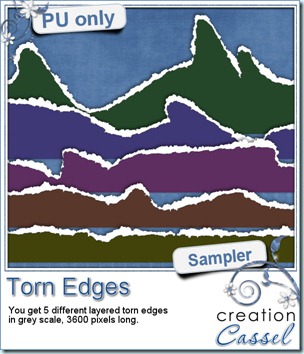
As a sampler, this week, i made 5 torn edges in PSD layered formats. I ran the script once with each of the “amplitude” option. They are in greyscale and you can use them as templates to create a torn edge on your own papers.
You need to be logged in to download this sample. You can either login, or register on the top of this page.
Thanks
You are welcome. Hope you find good use for them.
Thanks sooooooooooooooooo much for the torn pages. I have been wanting some to try–need to learn how to use them.
Maybe i should make a tutorial on how to use those layered templates, but if you figure it out before i do, do not hesitate to link to your masterpiece!
ganz herlichen Dank für das wunderbare Freebie,
aber wunderbar ist ja alles bei Dir.
Herzliche Grüße
SilviaB
Thanks, Cassel!! Can’t wait to play with these!
🙂 Mags / http://www.facebook.com/MagsGraphicsScrapKits