Newsletter
User comments
by Roberta Dugan
Other
Categories
- ADSR5
- Blog Train
- Call
- Campus
- Challenges
- chat
- Contest
- Freebies
- Grab bag
- My products
- My stores
- New release
- News
- NSBD
- Presentation
- Promotion
- RAK
- Sales
- Tutorials
- Uncategorized
Archives
- May 2013
- April 2013
- March 2013
- February 2013
- January 2013
- December 2012
- November 2012
- October 2012
- September 2012
- August 2012
- July 2012
- June 2012
- May 2012
- April 2012
- March 2012
- February 2012
- January 2012
- December 2011
- November 2011
- October 2011
- September 2011
- August 2011
- July 2011
- June 2011
- May 2011
- April 2011
- March 2011
- February 2011
- January 2011
- December 2010
- November 2010
- October 2010
- September 2010
- August 2010
- July 2010
- June 2010
- May 2010
- April 2010
- March 2010
- February 2010
- January 2010
- December 2009
- November 2009
- October 2009
- September 2009
- August 2009
- July 2009
- June 2009
- May 2009
- April 2009
- March 2009
- February 2009
- January 2009
- December 2008
- November 2008
- October 2008
My stores
New Tubes – Pipe Cleaners
27th April 2012
These tubes will surely bring a smile to your face. Mendy asked me if i could make something to simulate pipe cleaners, you know, those chenille stems that kids love twisting, bending and shaping. I am sure you have used them when you were a kid too, right? Now, these special picture tubes for Paintshop Pro will let you do the same and create fun shapes.
Since she was the first one suggesting it,she was given the whole set to “test” and she certainly had fun with them. She created the shapes that are in the freebie below.
You have 12 colors to play with. Doodle with your mouse and it automatically creates a pipe cleaner wherever you draw. You can also turn any vector shape into a pipe cleaner with a free script that is mentioned in the product description.
You can grab this whole set in my stores: Creation Cassel and DigiScrapWarehouse
Do you want a chance to win this complete set? You can add your name to the RAK thread in the DST forum. Just tell me what shape you would do with pipe cleaners and i will be back on Monday with the name of a winner. Remember that everyone will win something, even if you are not a PSP user! So go ahead, and post in that thread.
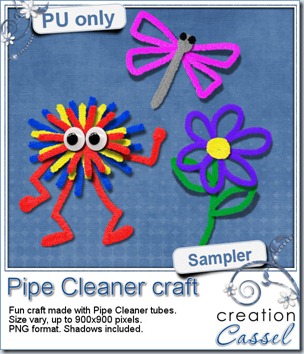
This week, i wanted to share some smile so this week’s freebie will be made of those fun shapes and creature made by Mendy. Aren’t they cute. Can you honestly say you didn’t even smile when you first glanced at them? Really? And you can make so much more with those Pipe Cleaners. The shapes and creatures are in PNG format and DO include the shadows. Click on the image for a direct download.
Remember to show us what you make with them!
April promotion
You still have just a few days left to finish building your discount for May. If you made a purchase, you got an individual email from me with the total calculated to date for your discount. If you are happy with it, it is ok. If you want to build it to the next level, you have until Tuesday night to make another purchase. That is only 4 days left. HURRY!
News from the Campus
The Campus is going steady. We have more and more visitors in the Campus. I am sure the students are bringing friends over, and that is quite all right.
Did you ever have a look at what the students of the Campus are doing? Check out the Gallery. That is where they post their work, and that is where you can leave them some nice comments.
Tutorial
This week, the new tutorial will be on how to make a braid. Yes, a braid as long as they want. Do you know the trick?

Workshop
Our next workshop will take place next week (yes, time flies, and i thought i still had two weeks to prepare). The topic this month will be about Brush Work in Paintshop Pro. Several people asked questions about brushes so i figured it would be a great topic. Thanks to those who suggested it. Now, you have to register so you can get the notifications. Remember, it is on May 6th, at 4pm Eastern Time zone, and once you register, you will get a reminder one week before, one day before AND one hour before. I know the time zone issue is terribly annoying for some who end up coming too early, or too late. Follow us on Facebook and there is an automatic “count down” so you will be notified as the time approaches.

New tubes – Gimp Trims #2
20th April 2012
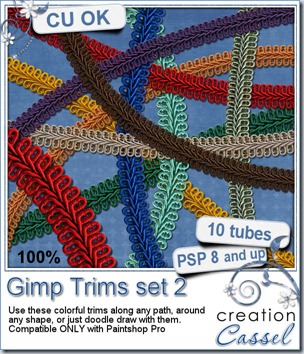
Did you like last week’s new tubes? I told you i had more in stock and here is the second set of Gimp Trim tubes.
If all those 20 colors included in both sets are not enough, you can definitely recolor them using various methods.
Now, it is time for you to doodle your way with those trims, create frames, add them to the center of a ribbon, place them at the end of a tag, or even place them on fringes to hold the threads!
These are exclusive picture tubes for Paintshop Pro only; sorry Photoshop users!
You can get this second set in my stores: Creation Cassel and DigiScrapWarehouse.
Are you unsure how those tubes can be used? Check out this video where i am using one of the trims from last week’s set.
So, what do you think of that? How fun and easy that is, right? You can win this set of picture tubes in this thread in the forum. Check it out, and add your name to the thread telling me which ONE color of this set you prefer (only ONE). Everyone will get a gift at the end. I will be back on Monday with the name of a winner.
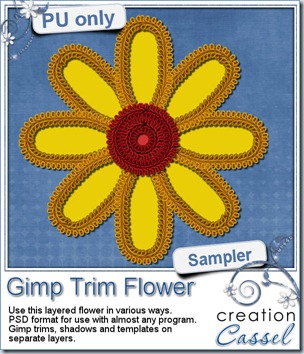
How about a freebie now? Spring is getting close, at least here, so i thought i would give you a bright flower. It is all layered (trim, shadow and template) and i PSD format so most of you could use it. You can use the trims only, the trims and templates, the trims and shadows, or all three (i guess you could also use the template only if you really want to!). Do you have a spring layout in the works? This might be a fun embellishment for it. Simply click on the preview to start the download.
Have you been following the newsletter for the store in the last few weeks? You surely know about the April promotion Build your own coupon, right? No? Well, you still have time to build your coupon.
Some customers have already built a nice 60% coupon. I am sure they are now planning their May shopping spree!
If you needed a little incentive to go and build your coupon, here is the BEST NEWS:
my birthday is Sunday
What does that mean?
You will have to check the Newsletter to get the news as early as possible. Not a subscriber yet? No problem . The newsletter goes out Sunday morning, Eastern time zone. I am not telling you more (although i am sure you might have a pretty good idea by now!)
And watch your email on Sunday morning!
And did you know that Corel is also celebrating my birthday? Isn’t it nice of them! From Friday, April 20th to Sunday April 22nd, Paintshop Pro X4 Ultimate is 50% off (upgrade or full version).
Click HERE to get your copy.
(ok, i admit it was for Earth day, and not my birthday, but i can still think it was just for me, can’t i?)
New tubes – Gimp Trims
13th April 2012
Would you have known the name of those trims? I remembered seeing them in sewing and craft stores, but we dont have those around anymore so it was a real hunt for the name.
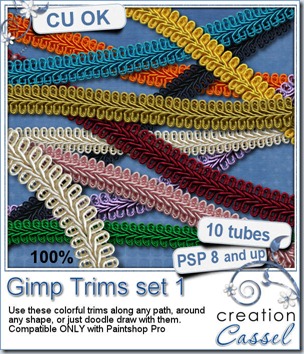
Doesn’t that look FANTASTIC as a trim? Best of all you can “draw” them any way you want because they are unique picture tubes for Paintshop Pro. As you move your cursor, the trim gets created. You can have them in a straight line, a curved line or around any shape you want. If you ever used those Gimp trims in traditional scrapbooking, now, you can do the same with digital scrapbooking. Add those to your layout, and best of all, you can make them any shape you need.
You can make frames with them, weave them like ribbons, place them on the seam between two papers, etc. You have so many options with those 10 different tubes. And if you want to change the colors, you can do that too (although i have 10 more in stock for another release!)
You can grab those 10 tubes in my stores: Creation Cassel and DigiScrapWarehouse.
And of course, as usual, you can get this set for free by adding your name to the Happy Place thread HERE. Not only will there be one winner, bur EVERYONE who post will get SOMETHING, just for posting! So go ahead and add your name. Tell your friends to come, so they can also get a surprise just for posting. I will be back on Monday with the name of a winner.
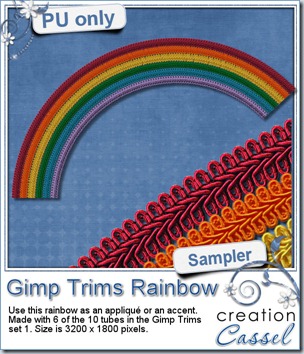
I was happy to have had 6 colors from the rainbow. Strangely, i had not planned it but it allowed me to create this rainbow for you. This was made using the Gimp Trims in this set. The rainbow is very large so you can resize it to meet your own needs. Simply click on the preview to start the direct download for this freebie.
What will you do with this rainbow? Show us what you do with it. I might just post this in the newsletter! I know you all love to see what can be done with my products, right? So don’t be shy. Share your masterpieces.
The Build your own discount coupon is still on for the rest of the month. Make sure you add up those purchases so you can get a nice coupon for May!
Last week, i had picked 5 random products that were on sale this week. You didn’t get them? Darn. The special ended today. BUT i have another offer for you. This next week YOU will choose what you want to see on sale. Post here (by adding a comment) or on our Facebook page (so you can also see what else is listed by other members), and i will pick the 5 most listed items to be on sale, starting Sunday night. Invite your friends to join in the listing too and you might just get YOUR favorite products on special.
A couple of weeks ago, there was a freebie with some plastic pockets. I was thrilled to get an email from Marj showing me what she did with that set of pockets. Here it is:
I love cats, and they all look so cute, don’t they? Did you miss that freebie? Check here for the Plastic Pocket sampler you can download and use, just like Marj did.
News from the Campus
After the hectic week when we had two workshop, this week is much more quiet. The Introduction to Scripts workshop, is available on Youtube and has already had 500 views! Yayyy! Did you miss it? You can view it all HERE.
The video for the Color your world workshop in the Campus is still available online only, but you can purchase the complete package so you wont have to worry about it not being there anymore, since it WILL be removed from view when the next workshop gets uploaded (likely the second week of May). The complete package includes the downloadable version of the video AND the complete written document you can also download.
Did you want all the documents in the previous workshops? They are all available too. View them and review them at your own pace, as often as you want. Print out the written documents, add your own handwritten notes if you want. This is a perfect way to built your own reference library for advanced Paintshop Pro users (even if you feel you are still a beginner!).
Are you afraid or intimidated by vectors? Are you wondering how to use vectors? This workshop will help you understand how they work so you can use them to create some pretty unique shape, or even text effects!
And of course, keep an eye on our next tutorials for the Element Creation Tutorials section. Did you know we already have 40 different tutorials available? Yup, they are adding up fast! Well, they are added on a weekly basis, but that is still becoming a fun list of tutorials.
New tubes – Stretchy Trims
6th April 2012
Ever wanted to use an elastic trim around a photo, or to attach something? It is hard to find the right trim in the right shape and the right size, so now, you can use those Paintshop Pro picture tubes to simply “draw” the trim any way you want. Make a straight or curved line, follow a path for a precise shape, wrap them around something else, etc.
You get 10 different tubes that will create a continuous trim wherever you want it. That is the beauty of digital scrapbooking: be creative!
You also have the advantage of being able to create multiple designs with only those products, so you should get more than what you pay for!
Sorry for Photoshop users, these only work with Paintshop Pro.
You can grab them in my stores: Creation Cassel and DigiScrapCampus.
You can have a chance to win this complete set of tubes in this thread. Just add your name and give me ONE idea of what you could use these trims for. Go for it. Be creative. Share your inspiration. I will be back on Monday with the name of a winner.
As usual, here is a freebie for you to check this out. This is a layered frame with two layers of stretchy trims, and one layer with some Ball Chain tubes too. Mix and match as you can hide one or two layers. This frame is in PSD format so any non-PSP user can actually enjoy it. The file also includes a template for the center so you can trim your photo easily to match the frame shape.
Click on the preview to start the direct download.
April promotion in the Store
Did you start shopping yet? Did you prepare your wishlist?
To help you with your shopping, there are some random products in the store that are on special this week. Check these out:
(more will be on special next week so keep an eye out for them)
News from the Campus
The Shop Class on “Introduction to Scripts” held last Monday was great. Although i actually messed up on something, LIVE, it seems that the participants were quite pleased (maybe they just liked to see me make a mistake?). Did you miss it? Lucky for you, it is now available on the Corel Youtube channel and you can view it as often as you want. Check it out HERE. Remember to click the LIKE button if you like it.
If you wanted to learn more about scripts, Suz Shook now offers whole scripting course for Paintshop pro right in the Campus. Click HERE for more information.
The recording for last Sunday’s workshop, on Color your world should be made available this weekend, meaning that the video for the March workshop, Playing with Vectors will not be free anymore so if you missed it, now is the time. If you want the option to download the video on your computer and the written documentation, you can purchase the package now and not have to worry about it being removed from free access.
See you in the Campus.
.
Corel Paintshop Pro X4
Scrapbook Campus
.