New script – Plastic Pocket

24th February 2012

cass-PlasticPocket

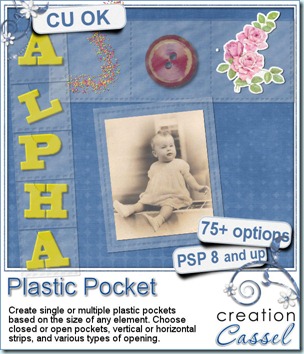
I noticed, in the digital scrapbooking forum, that  member was looking for something that simulates those plastic pocket protectors and several designers replied with their own versions. Very interesting products, and varied, but as a script coder I was wondering how one could get a real custom sized pocket for their special element that might not be standard size.

Now, this script will let any Paintshop Pro user create single or multiple plastic pockets. Do you have a large or a tiny element to store? No problem. You can also make multiple pockets (up to 8 compartments), in vertical or horizontal strip. You can have the pockets open or closed, and with different types of cutout for the open pockets (you know, to help you get things in and out easier).

What would you put in those pockets? Just about anything you want. You can place photos, buttons, beads, chains, leaves, stickers, tickets, tags, even alphas to create a title! Yes, why not make a title with those multiple pockets? That is a cool idea!

You can get this script in my store: Creation Cassel.

As usual, you have a chance to win this script simply by participating in the RAK in the DST forum. Check out this thread and tell me what you can think of inserting into those pockets. I will come back on Monday with the name of a winner.
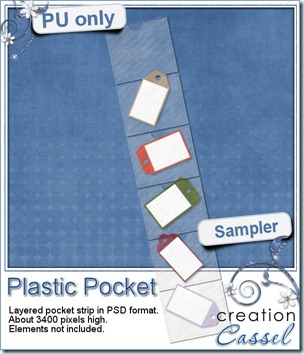
cass-PlasticPocket-sample I know you would like to see one of those pockets on your layout and play with it. You are lucky because i created this multiple pocket for you. It consists of two separate layers, in PSD format, so anyone can use it, even if you don’t have Paintshop Pro. Click on the preview to start the download of your freebie. What will you do with it? Remember to show me!

You will get a set of 6 open pockets, with that typical cutout on the top layer allowing you to get your elements to slightly stick out. For best results if you want elements to stick out, I would strongly recommend you watch the video on Interlacing element in PSP (even if you are not using Paintshop Pro, I am sure you can do something similar with Photoshop).


News from the Campus

Our next webinar is scheduled for next week. Will you join? We will be tackling Vectors as they tend to scare a lot of people (i have to admit, i was intimidated by vectors myself at first). Do you have specific questions for us? Just email me your questions ahead so i can plan to address those during the webinar. This is what we plan to address (but your suggestions might be added to those points)

  • basic vector shapes
  • create your own vectors
  • using vectors for other purposes

Are you having a hard time with the time zone issues? You are not alone, so here is a little list to help you:

Greenwich Mean Time: 10 PM (you cannot be in bed already!)

Atlantic time: 6 PM (this is where i am)

Eastern time: 5 PM

Pacific time: 2 PM

Eastern Daylight Time: 8 AM (for our Australian friends)


Click this button to register and be sent reminders by email


Last week, we added the Dymo tape tutorial for our Element Creation section.
DymoTape

Last weekend, i wanted to do more recording for the Element section but guess what? I got a little ill, and … i lost my voice! Yup, for 6 days, i either had a really bad voice, or no voice AT ALL! I should be able to record more tutorials this weekend to continue the series.


Last but not least, you only have a few days to refer friends to join the Campus (even for a free membership), and have a chance to win the access to one course of your choice in the Campus. Send your friends to THIS LINK so they can put your name as a referrer, and i will announce the winner in an email soon after the end of the month.


See you in the Campus!
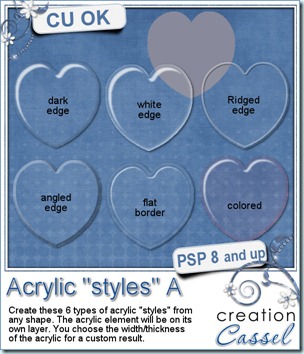
cass-AcrylicStylesA

Do you see all those styles available for Photoshop and wish you could use them in Paintshop Pro? Although this is not the case, this script will create a similar LOOK as some of the styles you could see to create acrylic. You get 6 options: dark edge, white edge, ridged edge, angled edge, flat border and colored acrylic.

Not only you can choose the type of edge, but you can also choose the thickness of the acrylic, meaning that the white reflection will be placed somewhat differently if you want a thicker or thinner element. Or in the case of the flat border and the angled edge, it will make it wider or narrower. The whole element will also be filled with a 5% opacity white so you will get that appearance of something to slightly change the color of the element or shape underneath. Another advantage of this fill is that you can grab and move the element without struggling to grab exactly the edge or so. No problem: grab it anywhere you want.

The script will use any solid shape to create the acrylic element on a totally separate layer so it will not affect the project you are currently working on.

You can get this script in my store: Creation Cassel .

Do you want a chance to win this script? Think of one element you can envision being turned into acrylic, and tell me in this thread. I will be back on Monday with a winner.

cass-AcrylicStylesA-Samples

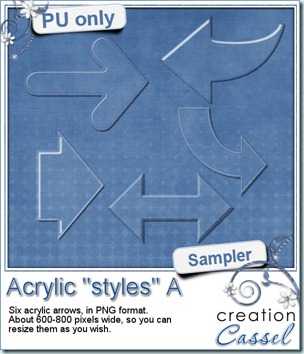
What do those styles look like up close? Here is a set of simple arrows made using 5 of the 6 styles. They are pretty large so you can resize them to match your project. They are all in PNG format so anyone can use them, in just about any program. Click on the image to start the direct download.

Since i have been able to recreate something similar to some common “styles”, can you think of other styles you would like to see for Paintshop Pro? Send me an email with samples or previews of styles you would like to see. Notice that this is Acrylic “styles” A, so i am hoping to get also a B and a C, and so on. Send me an email, send me a visual so i can work on that.


                        email


News from the Campus

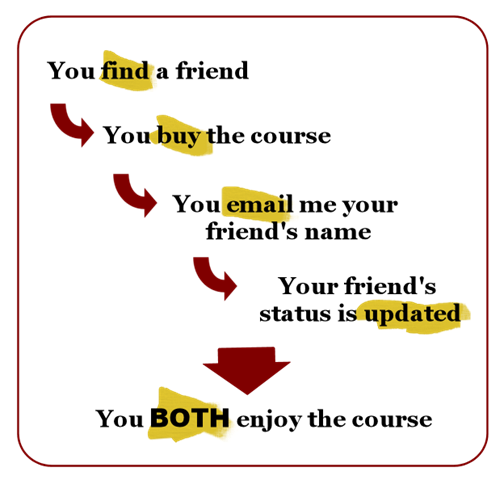
This week there is a special 2 for 1 promotion on either course of the Campus (the Basic Scrap course or the Element Creation course). Find a friend, and join together.

Two-for-One-B

It is THAT simple! Now you can enjoy the course you wanted to take, and it will cost you only HALF the price. This promotion is only valid until Sunday, Feb 19th, so hurry!

Choose the course you want!

basic    element-300

If you don’t know of any friend wanting to join with you, just post on our Facebook page looking for a “partner” and you might just find that person who was to shy to ask around! If you are a member of the DST forum, you can also post in the Scrap Talk section (someone did that last fall and found a partner very quickly). I guess you could also post a request in a comment to this post!


Did you get a chance to view the webinar recording on Using Layered Templates in Paintshop Pro? The video is available for FREE to anyone who has registered to the Campus. Dont worry, the registration is absolutely free.

LayeredTemplates

After you view the webinar, there is a little survey you can fill and once it is sent, you will get access to some goodies provided by the contributing designers, but we don’t want to abuse their generosity, do we?  So i make those goodies only available until Sunday, Feb 19th, which will be giving everyone 2 weeks to grab from the day of the webinar (which was held on Feb 5th). After that period, although the webinar will still be available, the goodies will be gone.


Speaking of webinars, they are currently ALL free, but starting in March, only ONE webinar will be accessible at the time to registered members, however, while changes are underway, all the recordings WILL be made available for download. Yes, you read it right, you will be able to purchase the downloadable versions of the webinars, view them whenever you want, even offline. This will be great for anyone with slow connection: no more choppy playing of the video; one (slow) download, but speedy playing afterward!


To benefit all the advantages of the Campus life, simply join us! Click the Subscribe button and you will be admitted immediately (no admission exam to fill out!)

button-register See you in the Campus!

New script – Pyrography

10th February 2012

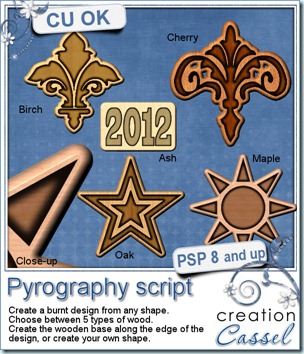
cass-Pyrography

When i was a kid, i got a pyrography kit. It was neat, but also dangerous. I have burnt my fingers a couple of time with the metal tip so i didn’t have a chance to use it that much. I loved the smell of the burning wood, and i thought the examples they were giving in the instruction manual were so great. But i was never able to do anything close to what they were showing. But now, with Paintshop Pro and this script, i could do pyrography as often as i want, without any risk of burning myself!

This script will allow you to create a burnt design of your choice. You can either let the script cut out a piece of wood for you in the shape of your design, or you can create a custom shape (as plain or intricate as you want) under it. You have 5 types of wood you can use (the seamless tiles are included in the zip file).

You can get this script in my store: Creation Cassel

And of course, you can add your name to this thread in the Happy Place for a chance to win it. What would you do with that script? What element would you create? Just tell me in the thread and i will be back on Monday with the name of a winner.

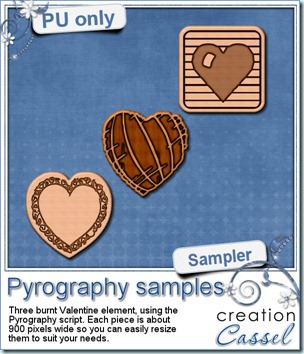
cass-Pyrography-samples Valentine Day is getting close, so how about a free sample of what this script can do, but in the shape of hearts? This is your freebie for this week. Each piece is about 900 pixels wide so you can (and definitely should) resize them to fit your projects. After all, you would not want to stick such a huge piece of wood on a layout, would you?

Simply click on the preview to start the direct download.


Remember how i keep telling you that if you use one of my samples, to please show it to me? Well, this week, Marj did just that. She used last week’s freebie and created this in honor of Carol King’s 70th birthday and she sent me her project, so i am sharing it with you. Thanks Marj for sharing.

Echo sample friend

News from the Campus

Last week, we held our monthly webinar. It was about using various types of layered templates. It was a great session. And the participants even saw me struggle a little bit since the PSPX3 is not behaving like the previous versions for one very specific function and it tricked me. But in the end, we figured out how to color some interesting flares! The video editing should take place this weekend, so i expect it will be up to view by Sunday at the latest. KEEP AN EYE on that page because this recording will be free to watch with registration to the Campus, but starting in March, it will be packaged as a downloadable video with the written handout, and sold. This will be the case of most of the webinars, so if you have not yet registered to the Campus, now is the time so you can at least view all the current webinars, AND download the written documentation. What are you waiting for? Here is theindex page for the webinars.

February 2012 – Using Layered Templates with Paintshop Pro

January 2012 – Seamless Design with Paintshop Pro

December 2011 – Details in the night

November 2011 – Be the master of time

October 2011 – Realistic Shadows in Paintshop Pro

September 2011- Playing with the Text tool


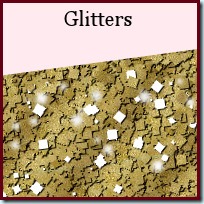
Last week’s newest tutorial for the Element Creation section was the Glitters. Yes, you can create glitters with Paintshop Pro, without the need of any outside plugin.

Glitters

Do you want to register for one of the Campus courses but you are low on cash? Listen to this super opportunity: you can win one course of your choice in the Campus (either the Basic Scrap course, or the Element Creation course for 6 months) simply be referring people to register in the Campus. No selling (although if they purchase one course, you earn more points). Tell people among your Facebook friends, your Twitter followers, your blog readers, your newsletter subscribers, etc. But wait! you have to send them to THIS LINK only, so they can put your name as a referrer. The regular registration in the Campus does not have that field, but THIS LINK does. If you are not yet a member, what are you waiting for? You join, and then you send friends over. So you still can accumulate points. They will be tallied at the end of the month.

Go ahead, and tell everyone around!


And finally, as Valentine Day is getting close, i will have a TWO FOR ONE special on Campus courses. Look for a friend who will want to share the cost of one course. You don’t know anyone who wants to join? No problem. Just post on your FB or Twitter. Even better, post on the Campus Facebook page looking for someone. Maybe someone is already looking for you! The special is not starting YET, but you have a few days to get ready for it!

Oh yeah, you will have to LIKE it first, so go ahead.

See you around!

New script – Echo

3rd February 2012

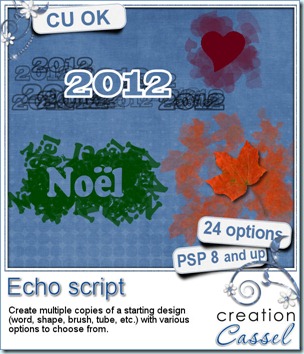
cass-Echo

Did you ever see those cool effects some scrappers (and designers) create with text, words, or shapes? Sometimes, they even turn those into photo masks for a really neat effect. After studying how it could be done using Paintshop Pro, i managed to code a script that can do just that, but also with additional options so that the user is not stuck into one look all the time.

With this script, you can use anything to start your project. You can use a word, a date (perfect for P365), a shape, a doodle, or even a tube. You can have the starting element always repeated in the same orientation, or rotated all over the place. You can have the copies in the same color or in greyscale or even in black. You can keep the element on top of the copies or cut out of the background. You can keep the background translucent, or totally opaque. You can also choose how many copies you want so you decide if you want a subtle background or something more obvious. And since there is a random feature coded into the script, you will NEVER get the same result twice, no matter how often you run it, even with the same option choices. Isn’t that neat? With this, you can create your own photo mask with your choice of shape. That is COOL!

You can get this script in my store: Creation Cassel .

Of course, as usual, i have a copy to draw for free, in the Happy Place thread of the DST Forum. Go add your name to this thread, and give me an idea on how you could use this script CREATIVELY, and you might just win it! Go for it!

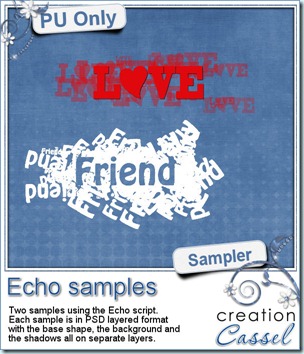
cass-Echo-samples I know, you want to get a chance to see this end product up close, right? So here is your chance. I created 2 samples in PSD format (so you can play with the pieces separately). What would you do with those? Just click on the preview to start the direct download.


Since February is often associated with Love, i figured you could probably use a LOVE and a FRIEND element in your layouts. If you do, remember to show me!


News from the Campus

As said above, February is often associated with Love and Friends, so there is that month long promotion where you can send your friends to register to the Campus and you can earn points each time. If they purchase a course, you earn more points but that is only optional. At the end of the month, there will be 3 winners. Great prizes to be won including a full registration to one of the Campus course, and some gift coupons from the store. But to get your points, you need to direct your friends to THIS LINK ONLY, so they can enter YOUR name as a referrer.


Sunday Feb 5th, we will have our monthly webinar. We will be showing a few tricks in using layered templates with PSP. We will look at different kinds of templates, and we will have some goodies too, so be there! You can still register.


button-register-150

And speaking of webinars, were you still waiting for the written notes on the January’s webinar (about Seamless design)? It is finally up, so do not hesitate to view the recording, and download the handout. It will not be free forever so take advantage of it NOW.


SeamlessDesign