
Web
Analytics

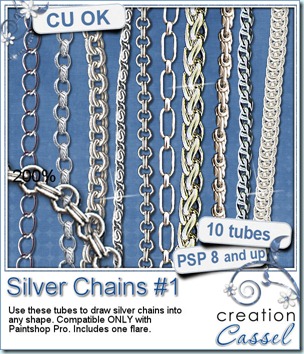
New product – SIlver chain tubes

cass-SilverChains1

If you are not a gold type of person, maybe silver will suit you better? Of course, you can still have both! These picture tubes will help you create delicate or ordinary silver chains. The step is set to give you the look on the preview, but you can surely experiment and get different result. Why not? This set includes 10 different tubes to install in your tube folder and to use just like a pen: draw anywhere, and create a chain as you draw. The zip file also includes a flare (and this flare is a little different than the one in the Gold Chains set so, no duplicate).

These tubes are available in my store: Creation Cassel and Do It Digi. Remember that the sale price is in effect only until Sunday night.

In case you would want a chance to win this set, you can go over to this thread in the DST forum and add your name to the thread, telling me which chain you prefer.

cass-SilverChainElements How about a little sampler? Check out these. They are 4000 pixels long chains. Use them to attach charms, or hold any other precious elements. They are in png format so anyone can use them.

You need to be logged in to download this sample. You can either login, or register on the top of this page.


New release – Gold Chain tubes

cass-GoldChains1

Did you like the rope tubes that were released in the last few weeks? But i am sure you would love to have something more sophisticated than ropes, right? So, how about some gold? These tubes will let you create fantastic necklaces, bracelets or any other precious elements. Use them in straight lines, in freeform, along a path or around a shape. You get 10 different tubes. Use the default settings to get the look like in the preview or change the step or the size for different looks. The zip also includes one flare so that your jewellery can really shine!

You can find those in my stores: Creation Cassel and Do It Digi.

For a chance to win this set of tubes, go add your name to the RAK thread at DST here. (now… if you are not a PSP user and want to join in the fun anyways, go add your name; you might not win the set but you might win something else *hint*hint*)

cass-GoldChainElements Now, whether you are a PSP user or not, you can enjoy some gold anyways.

You need to be logged in to download this sample. You can either login, or register on the top of this page.
Now, what do you think i have in stock for future releases???

New script – JPG Bleed

cass-JPGBleed

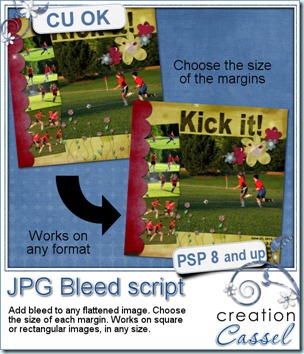
If you ever wanted to print your layouts either for individual pages or in a photo book, you needed to know how to add some “extra” margin around your design. Have you ever wondered why printers will ask you to add some margin, just to trim them after? To put it simply, it is too hard to be perfectly exact when trimming the paper, and if the cutter is just a few pixels short of the edge, you will get a tiny unsightly white line along that border. Having the paper or the design wider where the printer can cut in, will make sure that there is no such white line. But what if you dont add such a margin (called “bleed”)? The risk is that it will trim INSIDE your margin and you MIGHT loose some details if they are on the edge (like fine borders, journaling, etc.).

All that to tell you why it is important to have a bleed around your pages before you send to print. But what if you did your whole layout, and forgot to add the bleed? If you still have the layered file, it should be fairly easy to enlarge the background paper while leaving the more meaningful details intact. But what if you do not have those layered formats, for whatever reason? This script will take any jpg image and add a margin around it, in matching colors. You even have the option to choose different margin for each side so that you can match the specifications required by any printing service.

Someone mentioned that she had made paper scrap pages and photographed them. Of course, this will give only a flattened image, with no margin. This script would be perfect for her, dont you think?

This script is available in my stores: Creation Cassel and Do It Digi.

If you want a chance to win this script, just go add your name to the RAK thread at DST and tell me why you need this script. I will draw for a winner Monday night.

Twisted Ropes – Picture tubes

cass-TwistedRopes

This is my third set of Rope tubes. If you are a regular PSP user, you know that directional tubes will allow you to literally “draw” wherever you want, however long you want. Just doodle with the tube and you will get a rope along the way. You get 10 different types of twisted ropes, mostly neutral kinds.

These tubes work with PSP 8 and up.

They are available in my store: Creation Cassel.


cass-TwistedRopes-samples And here is your free sample. This set includes 3 PSD layered files with shadows in separate layers if you want to use them. They were all made with the Twisted Rope tubes.

You will get one tag tie, one bow and one star frame.

You need to be logged in to download this sample. You can either login, or register on the top of this page.